
Dynamics Purchase Order Processing is an ideal solution for businesses that want to fully automate the process of issuing and managing purchase orders, and the receiving of inventory tracked by purchase orders.
Purchased Order Processing efficiently manage compels, multi-item, multi-site purchases. Seamless integration with Dynamics General Ledger, Payables Management and Inventory Control provide automatic updating of critical information.
Powerful purchase order entry options streamline business processes
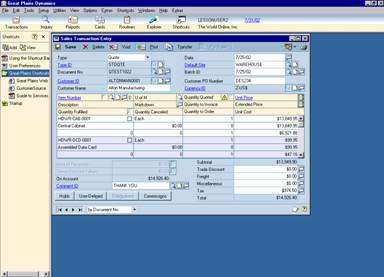 |
Fully automate
the process of issuing and managing purchase orders, and the receiving of
inventory tracked by purchase orders. |
Buyer id: Identify which users in your system are also buyers in your organization. Tracking the buyer id per purchase order gives you the flexibility to track each agent’s orders and monitor their workload. Also, any questions that arise during the receiving or payment of the order can then be easily routed to the appropriate purchasing agent.
Drop ship orders: Easily ship orders directly from supplier to customer, and bypass the typical Inventory update process. Users can select the customer and customer address information as they’re entering the purchase order so your vendor can ship the items on the purchase order directly to the customer.
Change saved purchase orders: Eliminate the need to create a new purchase order for a few added items. This also enables you to create preliminary purchase orders and add, change or delete line item information before completing the purchase order.
Multi-site orders: Avoid duplication of effort by identifying which items will be received at each site.
Vendor’s item numbers: Use the numbers your vendors use, making it easy for them to fulfill your orders.
Track cancelled items: Keep track of requested items even after they’ve been canceled, for complete purchasing audit control.
Edit item description: Add detail or change descriptions to accommodate differing descriptions between vendors.
Vendor information: Instantly key vendor information such as minimum order amount, contact person, address, average lead-time, and more.
Line item information: Instant access to valuable information such as date required, date promised, originator and item comments will speed inquiries and increase satisfaction with your purchasing system.
Confirmation person per item: Track who requested each item on the order, and later view an inquiry showing the status of that person’s ordered item.
Rollup of purchase order line items: Create a purchase order displaying all “like” items on a purchase order. This purchase order will combine purchase order lines if the Item Number, Vendor Item Number, Unit of Measure, and Cost are the same-making it all possible for purchasing agents to be more efficient when placing orders for needed inventory items.
Track free on board: Use the FOB designation per line item to identify the point at which the buyer takes ownership of a shipment from a vendor, should any kind of in-transit damage or loss occur.
Release line items by date: Manage the release of each individual purchase order line to your vendor, ensuring that items arrive by the date when needed, but not so early that you end up carrying extra inventory on your shelves.
Purchase order statuses: Analyze the progression of your documents throughout the entire purchasing process. The statuses purchase orders may automatically go through include New, Released, Received, Change Order, Cancelled and Closed, based on the actions performed on the document.
Revision numbers: When a purchase order is released to the vendor and then edited further, a Change Order status is assigned to the document, as well as a revision number, which will automatically increment and display on the printed purchase order. This will help ensure that both you and the vendor are referring to the same document throughout the purchasing cycle.
Automate your distribution process with integration to Sales Order Processing
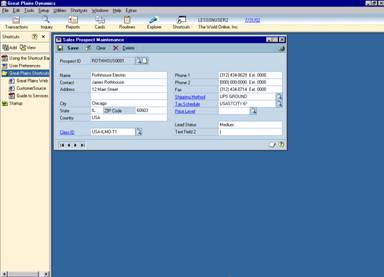 |
Choose to generate all Purchase Orders
originating from back orders and orders together in the Purchase Order Preview
window or easily click off the ones you do not want to purchase at this time. |
Automated purchase order generation: Streamline the purchasing process from within Sales Order Processing, by creating purchase orders in response to quantity shortages on customer back orders and orders. View and manage these documents from within purchase order processing, with options to delete links to sales orders or create new ones.
Link sales order lines to purchase order lines: Improve customer satisfaction by linking your purchasing activity to customer requests from within purchase order processing. Purchase order line items may be manually linked to and thereby reserved for sales orders, ensuring fast delivery of products to customers upon receipt.
Prioritization: Link multiple sales documents to your purchase order, and prioritize the order in which the sales documents should be fulfilled.
Track commitments: Track and validate commitments against budgets by period, year-to-date amounts or on an annual basis right at the time of purchase order entry. This includes an authorization process to exceed the allotted budget amounts. Seamlessly report committed purchases with any of your financial report to keep a pulse on your purchasing activity.
Complete flexibility in recording shipments and invoices
Record shipments and invoices: Streamline departmental workflow by allowing shipments and invoices to be recorded separately or together.
Place purchase orders on hold: Provide greater control and accuracy over the receiving process by preventing a receiving document from being entered against the purchase orders on hold.
Match shipments and invoices: Align your shipments and invoices, no matter how you receive them. Shipment to invoice matching enables you to automatically create General Ledger entries for goods received without an invoice, keeping General Ledger in balance with Inventory.
Cost variances: Easily manage cost variances between the time you review the shipment and the time the invoice arrives, automatically posting any necessary adjustments to General Ledger and updating Inventory.
Receive items that aren’t on purchase order: Allow for special circumstances and retain complete receiving tracking by entering receipts without a purchase order.
Receiving/invoicing against multiple purchase orders: Select multiple purchase orders at the time goods are received and/or invoiced. Whether entering shipment only, invoice only, or shipment/invoice, you can select to view all purchase orders associated with a vendor.
Non-inventoried items: For special request items or for items that are ordered before being added into your Inventory records, Purchase Order Processing enables you to order and receive non-inventoried items. Authorized users also have the ability to add items to Inventory during the purchase order or receiving process.
Comprehensive receipt information: Capture all the information that’s important to your business. Receipt information includes receipt number, vendor document number, receipt date, posting date and actual shipment date. Item information includes quantity ordered, quantity shipped, quantity previously shipped, quantity invoiced, quantity previously invoiced, quantity rejected, quantity cancelled, and actual ship date.
Partial shipment: Record as much of the order as you receive, and keep the order open as long as you need.
Entire shipments: Accept shipment for entire purchase order, or check off individual items to ensure you accurately record the details.
Change site id at receiving entry: Easily adapt to unforeseen circumstances and receive your items into a location different than originally planned for on the purchase order.
Auto generate serial numbers: Save data entry time and reduce the chance of errors by automatically generating serial numbers for your items upon shipment.
Track bill of lading/progressive number: Purchasing agents will be able resolve shipping questions or concerns more quickly and efficiently by recording the bill of lading or progressive number assigned by the carrier.
Approvals process: Take control of your spending by assigning pre-approved purchase level rights to all users in your system, ranging from no approval rights, to specific amounts, to unlimited. Validation of rights will be performed when appropriate, ensuring that purchase orders cannot be printed, received or invoiced without the proper approval.
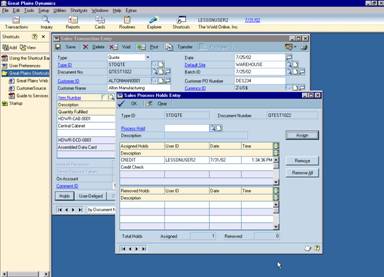 |
Instantly check and see what purchasing orders are out there waiting for approval (the ones you
see is based on how the approval set has been configured). Simply click and
approve the ones you want to let go. |
Receipt closing: Purchase Order Processing automatically marks items as closed during receipt posting, and automatically closes purchase orders when all items are received and invoiced.
1099 information: Easily record and report vendor 1099 information. 1099 forms can be printed for a prior year even after you have entered and paid vendors in the new year, giving you accurate government reporting when you are not able to perform calendar year-end processes prior to generating vendor payments in the new year.
Posting: Match posting routines to your business practices. If you need to update received items instantly, receipts can be posted individually upon entry. Or, if you prefer to review receipts before posting, you can save receipts in batches and post together after approved.
Unparalleled access to decision driving information gives your business a superior competitive advantage
Purchase Order inquiries: Get instant answers to your purchase order, shipping and receiving questions. View open or historical purchase order and receiving documents by order number, item number or date.
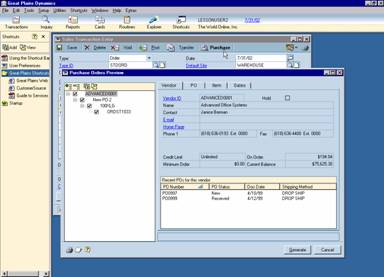 |
Purchasing Inquiry window allows you to
instantly view purchase orders and locate the vital information you are looking
for, you can even drill back to information giving you more details to base
decisions on. |
Easily locate the underlying information you’re most interested in: Drill downs can cross modules, so purchase activity can be followed back to the purchase document on which it was first recorded.
Rich reporting capabilities provide in-depth activity tracing and analysis
Purchase Order Processing: Analyze all facets of your purchase activity with comprehensive reports including Purchase Order Status, Purchase Order Analysis, Invoice Cost Variance, Received/Not invoiced, shipment/Invoice Matching Activity, plus posting and history reports.
Report options: Create a suite of reports that present the information you need in the best format for your business. You can save unlimited versions of each report, and group reports for consistent analysis. Reports can also be added to the Shortcuts Bar, enabling them to print their own reports whenever needed.
On-screen reporting: Quickly print any report to your screen and electronically search for specific information you need.
Post reports on your financial intranet: Share pricing and availability reports with authorized employees anywhere, anytime.
Custom reports: For complete reporting flexibility and power, the Dynamics Report Writer and Crystal Reports Professional enable you to modify existing reports or create entirely new reports, including graphing capabilities and the ability to export data to spreadsheets and other applications.
Delivering the power of the Internet to your business: Employees and Managers throughout your organization can receive accurate and up-to-date inventory information, without having to have access to the accounting system. Great Plains eView provides business intelligence by securely connecting your Dynamics information with the Internet.
Purchasing views: Instantly check detail or summary purchase information for items and vendors from any computer that is attached to the Internet. Purchase views include calendar and fiscal year purchases by vendor, detail or summary purchases by vendor, and detail or summary purchases by item, plus you can post any or all Dynamics reports online through eView.
Multicurrency functionality for your growing business
Multiple currency options: Efficiently enter and view multinational transactions in originating or functional currency, translated using exchange rate tables.
The euro: With the introduction of this new trading currency, Purchase Order Processing allows you to enter, track, inquire, and report euro denomination transactions for your European customers as easily as national currency transactions.

CompuAll, Incorporated Quality
Solutions Since 1985
10061 Talbert Avenue #200
Fountain Valley, California 92708 USA
Phone: (714) 964-2140 Fax: (714) 964-1491
For a demo or more information E-Mail us at
info@compuall.net for more information.